


Mobile Text Alerts | SMS + MMS
3.328.00 Reviews
App Specs
- Version
- 3.4.21
- Updated On
- License
- Free
- Downloads
- 10,000+
- Developer
- Vimbly MTA
- Categories
- Communication
- Platform
- Android
Screenshots
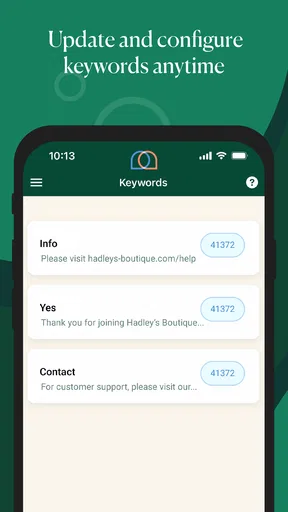
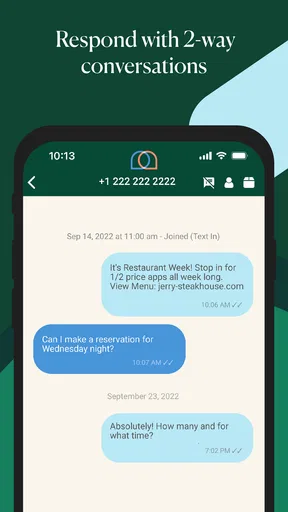
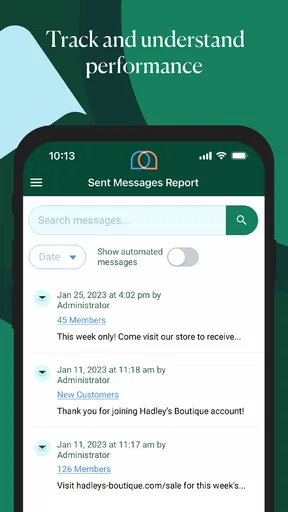
 Analysis by AppCompare
Sending a text to one person is easy; communicating with a whole audience is where the practical problems begin. Mobile Text Alerts | SMS + MMS is built for that second situation, giving businesses, organizers, and other groups a way to send mobile messages intended to support sales and engagement. I approached it less like a casual messaging app and more like a focused communication tool, paying close attention to who would benefit from it, where it adds value, and where a user should slow down before committing to a broader messaging workflow.
The app is developed by Vimbly MTA and belongs to the communication category. It is free to install, carries an Everyone age rating, and has reached over ten thousand installs. Its average score is 3.3 from 97 ratings, with 28 written reviews, so the public response looks mixed rather than overwhelmingly enthusiastic. That matters here: this is not an app I would recommend simply because it has a familiar purpose. I would recommend testing it around a clearly defined messaging task and judging whether its controls fit the way you intend to contact people.
What the app is really suited to
In everyday use, the appeal is straightforward. Instead of treating every message as a separate conversation, the service is aimed at sending SMS or MMS communication to an audience. That makes sense for a shop announcing a limited offer, an event organizer sharing a last-minute change, or a service provider reminding a group of customers about something important. The value is not in replacing personal chat; it is in making audience communication more deliberate and repeatable.
I would not put it in the same mental category as ordinary texting apps such as the default Messages app. Those apps are excellent when I already know the recipient and want a private exchange. This tool is more relevant when the message itself is part of an outreach process. The trade-off is that outreach requires more care: the wording, recipient selection, timing, and expected response all matter more than they do in a one-to-one conversation.
A realistic example would be a small fitness instructor managing a weekly class. Rather than sending separate reminders from a personal phone, the instructor could use an audience-focused service to communicate a schedule change or promote an open session. The useful question is not merely whether a message can be sent, but whether the workflow helps the sender avoid confusing a promotional announcement with a personal conversation. That distinction should shape how cautiously the app is introduced into a real routine.
It can also make sense for a community group that needs fast updates without asking everyone to check an email inbox. SMS has an immediacy that email newsletters often lack, while MMS can make a message more visual when a picture or other media is genuinely useful. Still, I would reserve this approach for messages that deserve attention. Sending too often can make people ignore future alerts, regardless of how convenient the sending tool is.
Trust starts with the sender’s responsibility
For a communication app, trust is not just a question of whether the interface looks polished. It also depends on whether I can understand what I am doing before a message reaches an audience. The store summary presents the product as a way to drive sales and engagement, which places it closer to business outreach than private messaging. That means I would treat recipient expectations, consent, and message relevance as part of the setup rather than as afterthoughts.
Worth Reading Before You Choose

Flipboard Shows What News Apps Must Do Beyond the Feed

Switching to Android Auto Means Rethinking Your Driving Routine

Google Calendar Makes a Crowded Week Easier to Manage

Ludo King Makes the Most of the Minutes Between Plans

Baby Panda World Brings Quick Play to Modern Phones, but Its Game Library Feels Busy

ESPN’s Live Game View Makes Following Close Games Easier
The app’s public footprint is modest, and the 3.3 average suggests that experiences are not uniformly smooth. I would not read that score as proof of a particular defect, but I would take it as a reason to begin with a small, low-risk audience. A careful trial can reveal whether the app’s audience workflow matches your needs before you depend on it for a time-sensitive announcement or a large campaign.
One practical habit is to write the message first in a separate note, then check it for clarity, timing, and unintended ambiguity before opening the sending workflow. That small pause is especially useful for SMS, where a short message can sound much harsher or more promotional than intended. If an image is involved, I would also ask whether MMS adds real value or merely makes the message heavier and less focused.
Controls I would check before sending
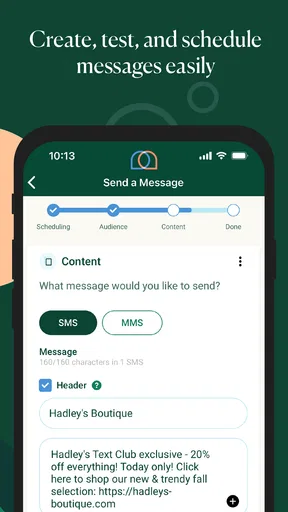
The most important controls are the ones that determine who receives a message and what happens after it is sent. I would look for clear audience selection, an obvious review step, and a way to distinguish a draft from a message that is ready to go. These are not glamorous features, but they are the controls that protect against the most expensive everyday mistake: sending the right text to the wrong group.
I would also inspect the account area before importing or organizing contacts. A user should know which audience is being used, whether a message is intended for SMS or MMS, and where any billing action appears. If the app makes those choices easy to see, it becomes much easier to operate responsibly. If they are buried behind dense screens or unclear labels, I would keep the workflow smaller and more manual.
Another useful check is to separate operational messages from promotional ones. A class cancellation, delivery change, or event update has a different purpose from a sales offer. Keeping those audiences and message styles distinct reduces the chance that an important notice is diluted by marketing content. This is a workflow decision I would make even if the app itself does not force the separation.
The current version is 3.4.21 and the minimum operating-system requirement is Android 7.0. That makes the app accessible to a broad range of Android devices, including some older phones. I would still update the operating system where possible and review the app after updates, especially if messaging is part of a business routine. Compatibility is helpful, but it does not replace checking whether the current interface still behaves as expected on your particular phone.
Where data sensitivity becomes practical
Audience messaging naturally involves information that deserves care. Contact details, message content, and the identity of a recipient can all become sensitive in the wrong context. I would avoid placing unnecessary personal information into a message and would keep lists limited to people who genuinely need the communication. A short, relevant alert is safer and easier to manage than a message containing private details that do not need to travel through a mass-sending workflow.
I would be particularly cautious with customer records, health-related information, financial details, or anything that could embarrass someone if sent to the wrong person. The convenience of audience messaging can encourage a sender to move quickly, but speed is not a good reason to include more information than necessary. For a sensitive situation, a private channel or a direct conversation may be the better choice.
The app is free to install, but in-app purchases range from $4.99 to $274.99 per item. That range makes it important to understand the commercial side before building a regular process around the service. I would not assume that installing the app tells me what a complete messaging workflow will cost. Instead, I would review each purchase screen carefully, identify what action triggers a charge, and make sure the account owner—not an occasional staff member—controls purchasing decisions.
This is also why I would keep a simple internal record of who is allowed to send messages and who is allowed to approve spending. A small organization may have one person doing both jobs, while a larger team may need separation. Either way, the goal is to prevent a rushed campaign from becoming an unexpected expense or an accidental use of the wrong audience.
When a message concerns an appointment, payment, or personal circumstance, I would use the least revealing wording that still solves the problem. For example, a general reminder can be preferable to including a detailed explanation in the message itself. This is not an app-specific trick; it is the kind of discipline that becomes more important when a tool is designed to reach many people at once.
Keeping the user in control
User agency matters most at the moment before sending. I want to feel that I can stop, revise, or narrow a message without fighting the interface. In my own evaluation of a tool like this, I would treat the review screen as a decision point, not as a formality. I would reread the audience, the wording, the media choice, and the intended purpose every time the message has commercial or personal consequences.
I would also establish a small test routine. First, prepare a message that contains no sensitive information. Next, verify the intended audience and review the purchase path without completing it unless the cost is understood. Then, send only when the account owner is satisfied with the wording and recipient selection. This approach is slower than tapping through quickly, but it is far less disruptive when the app becomes part of a real organization’s communication habits.
For a team, written rules are more valuable than relying on memory. Decide who can create an audience, who can approve promotional wording, and who handles replies or opt-out requests. The app may help with sending, but it cannot make those organizational decisions for you. If your group has no clear owner for incoming responses, a different communication platform with stronger shared-inbox tools may be a better fit.
That comparison is important. Email marketing platforms are often better when I need longer content, detailed campaign reporting, or a more structured subscription process. A normal phone messaging app is better for a handful of personal conversations. Mobile Text Alerts sits between those choices: more audience-oriented than ordinary texting, but not something I would automatically select for every marketing or customer-support job.
Who should use it, and who should skip it
I see the strongest fit for a small business, local organizer, instructor, or community manager who already knows why mobile alerts are useful and wants a dedicated way to communicate with an audience. The app’s focus is narrow enough to be helpful when the main goal is sending text-based updates rather than managing a broad collection of collaboration features.
I would be more cautious about recommending it to someone who only needs occasional one-to-one messages. For that person, the built-in messaging app is likely simpler and avoids introducing an audience-management workflow where none is needed. I would also hesitate if the main requirement is a sophisticated marketing dashboard, detailed analytics, automated customer journeys, or a deeply integrated support inbox. Those needs point toward a more specialized service.
The mixed public rating reinforces my preference for a measured rollout. I would install it on the actual device used for communication, check how comfortably the account and audience steps fit the team, and test the process with a narrow group. If the workflow feels clear and the purchase controls are understandable, it may earn a place in a small organization’s toolkit. If basic choices feel difficult to verify, I would not force it simply because SMS is a familiar channel.
One overlooked trade-off is that the immediacy of a text can create pressure to send before the message is ready. I would counter that by preparing reusable message drafts for recurring situations, but editing each one before sending. A template can prevent forgotten details; it should never become an excuse to send outdated information to the wrong audience.
My cautious verdict after using it
Mobile Text Alerts | SMS + MMS makes sense when the problem is clear: I need to communicate with an audience through mobile messages, and I am prepared to manage that responsibility carefully. Its free installation and broad Android compatibility lower the barrier to trying it, while the audience-focused purpose gives it a more specific role than a standard texting app.
My recommendation is conditional rather than automatic. Start small, keep messages relevant, separate announcements from promotions, and inspect every purchase and audience choice before committing. Because the public rating is only a 3.3 average and the available purchase range reaches $274.99 per item, I would not make it the foundation of a large communication operation without first proving that its controls and costs work for your team.
For a modest group that values direct mobile alerts and can maintain careful sending habits, it is worth exploring. For private conversations, highly sensitive information, or advanced campaign management, I would choose a more suitable alternative. The app’s real strength is focus, but that same focus means it should be judged on the clarity of its sending workflow and the control it gives the person behind the keyboard.
Pros
- Quickly sends SMS and MMS alerts to large contact groups.
- Supports scheduled messages for planned announcements and reminders.
- Two-way texting enables recipients to reply directly to alerts.
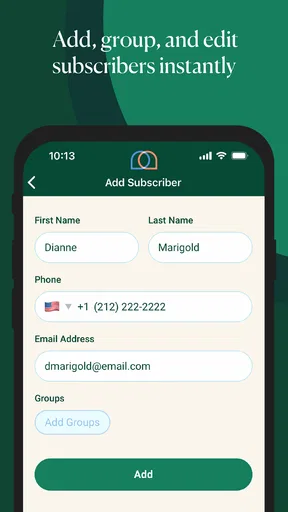
- Contact management helps organize subscribers and communication lists.
- Useful delivery tools can improve outreach for businesses and teams.
Cons
- Requires a paid plan or credits for continued high-volume messaging.
- MMS features may have limits depending on the selected subscription.
- Recipients may incur carrier charges when receiving some messages.
- Advanced features can take time to learn for first-time users.
- Message delivery depends on mobile networks and carrier availability.
FAQs for Mobile Text Alerts | SMS + MMS
What is Mobile Text Alerts, and what can I use it for?
Mobile Text Alerts is a business-focused messaging platform for sending SMS and MMS communications to groups of contacts. After reviewing its features, it is best suited for announcements, reminders, promotions, emergency notifications, appointment updates, and internal team communication. It is not simply a personal texting app; most of its tools are designed for organizations that need contact management, scheduled campaigns, and trackable mass messaging.
Can Mobile Text Alerts send both SMS and MMS messages?
Yes, Mobile Text Alerts supports SMS text messages and MMS multimedia messages, allowing users to include images or other supported media where available. This makes it more flexible than a basic bulk-texting service, especially for promotions, event information, and visual announcements. However, message limits, supported file types, carrier rules, and potential additional charges may vary, so reviewing the current plan details before sending large campaigns is recommended.
Is Mobile Text Alerts free to use, or does it require a subscription?
Mobile Text Alerts is generally intended for organizations and businesses, so access to its full messaging features typically depends on a paid plan or account configuration rather than unlimited free personal use. Pricing can vary according to the number of contacts, messages, users, and features included. Before downloading or signing up, check the latest pricing information, trial conditions, message allowances, and any carrier or overage fees.
Can I schedule messages and manage contacts in Mobile Text Alerts?
Yes, contact organization and message scheduling are among the practical reasons to use Mobile Text Alerts. Users can generally build recipient lists, segment contacts, and prepare messages to be sent at a selected time. These functions are useful for recurring reminders, marketing campaigns, school updates, and staff notifications. The exact automation and scheduling options may depend on the subscription level and account permissions.
Is Mobile Text Alerts safe and suitable for sending messages to customers?
Mobile Text Alerts can be suitable for customer communication when it is used responsibly and in compliance with applicable messaging laws. You should only text people who have properly opted in, provide clear identification, and honor unsubscribe requests promptly. Because SMS and MMS campaigns involve personal phone numbers and potentially sensitive information, review the platform’s privacy policy, security practices, data handling terms, and compliance requirements before importing contacts or launching a campaign.


